One public YouTube link can contain several useful assets. A course team may need a subtitle file for review; a creator may need an authorised audio reference; a marketing team may need a permitted thumbnail for its archive. Treating each of those needs as “download the whole video” creates unnecessary work and makes file organisation harder.
HSK Download lets you inspect a public link and choose only the resource that the source makes available. Use it only for content you own, content the rights holder has authorised, or content that the platform expressly allows you to save.
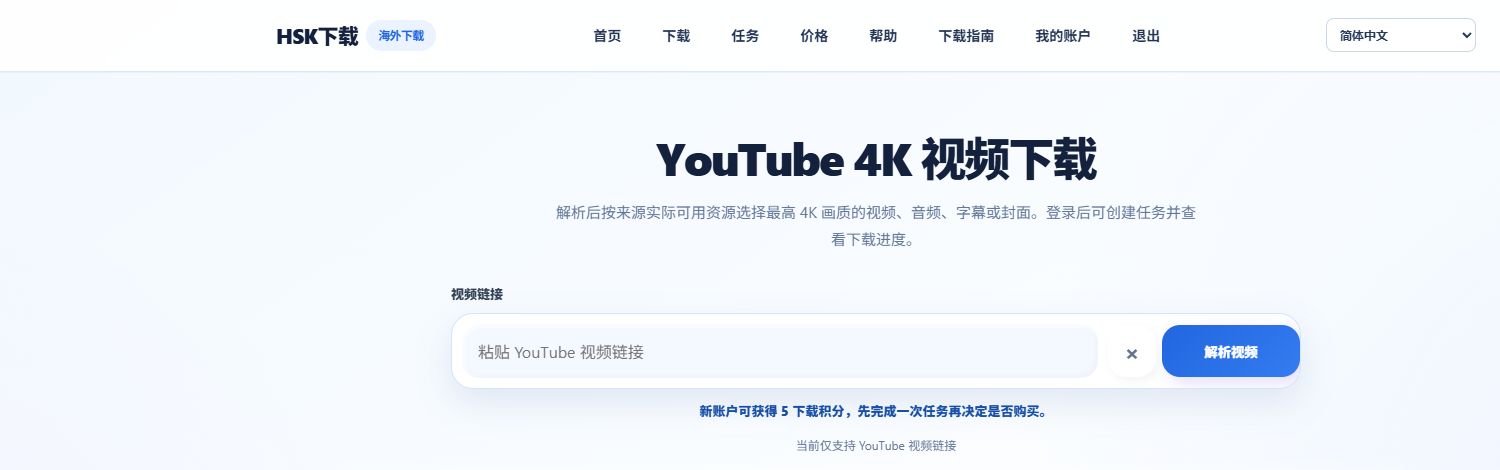
!Enter an authorised public YouTube link in HSK Download
Start with the intended use, not the largest file
After opening an authorised public link in HSK Download, select Analyse video. The result shows the resource types currently available from the source. Choose the smallest, most relevant asset for your authorised purpose:
| Resource | Useful authorised scenario | Check first |
|---|---|---|
| Audio / MP3 | Creator archive, podcast edit reference, approved course material | Confirm the displayed format and credit use. |
| YouTube Shorts video | Archive of your own Short or an approved client deliverable | Confirm the complete public link and the available quality. |
| Subtitles | Accessibility review, transcript correction, course localisation | Check language and subtitle availability. |
| Thumbnail / cover | Design archive or authorised campaign handoff | Keep the associated permission and source record. |
Saving authorised audio or MP3
Audio is useful when the sound—not the picture—is the asset you need. After analysis, choose an available audio option and check the expected credit use before creating the task. If you intend to edit, distribute or publish the audio, your authorisation must cover that use as well as the original video.
For organised archives, use a consistent file name that records the project, source, date and permission reference. This is more helpful than creating multiple copies of the same file.
Saving a Short you are allowed to use
Shorts are still video works. Public visibility does not change the permission requirement. Use the complete public Shorts link, analyse the formats that are actually offered, and select only the file needed for your approved workflow.
If analysis fails, first check whether the Short is still public and whether the copied link is complete. Do not submit repeated duplicate tasks; a failed task before completion does not use the final credit charge.
Saving subtitles for review and accessibility
Subtitles can be a better starting point than a video file when the task is transcript review, accessibility QA or authorised localisation. The available subtitle languages depend on the source. Select the subtitle resource only after confirming that it is the correct language and version for your project.
Keep any corrections and the permission record with the project. A subtitle file is still derived from the original work and may not be republished without permission.
Saving a thumbnail or cover asset
A thumbnail can be useful in an authorised brand archive, a course catalogue or a handoff package. It should not be treated as an unrestricted stock image. Save it only when your rights allow the planned use, and preserve the original source reference.
Format and playback notes
For audio, choose the available format that matches your player or editor. For video-based Shorts, a compatible MP4 option is usually the broadest choice when it is offered. High-quality originals can use codecs such as VP9 or AV1, which may require VLC, PotPlayer or Infuse on some devices.
FAQ
Can I make an MP3 from any YouTube video?
No. You need the right to process the content, and the source must make an appropriate audio resource available.
Are subtitles always available?
No. Subtitle and language availability is determined by the source and can differ for every video.
Is a thumbnail free to reuse because it is public?
No. A visible thumbnail can still be protected by copyright, branding or contract terms. Use it only with the appropriate permission.
Next step
Analyse an authorised public YouTube link and select only the asset your project actually needs.
For an authorised video workflow focused on MP4, 4K and the formats actually provided by the source, see the MP4 and 4K format guide.