When an authorised YouTube download workflow does not behave as expected, repeating the same request is rarely the best first move. The useful question is what changed: the public source link, the source availability, the selected resource, the browser, or the local player.
This guide is for videos you own, videos the rights holder has allowed you to save, or uses expressly permitted by the source platform. HSK Download can inspect an authorised public YouTube link and show the resources currently available from that source. It cannot make a private, removed, restricted or unavailable source accessible, and it does not provide rights to copy someone else's work.
!HSK Download page for analysing an authorised public YouTube link
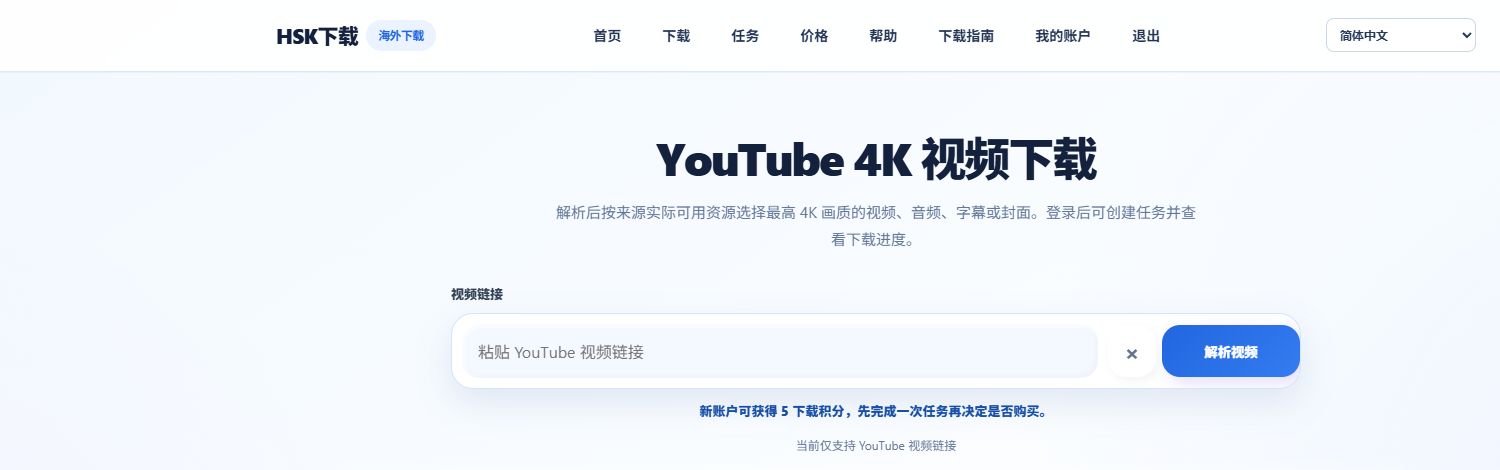
Start with the shortest diagnostic path
Work through these checks in order. Stop when you find the cause instead of creating duplicate tasks.
- Confirm you have the right to save the video or asset for this specific purpose.
- Copy the complete public YouTube URL again from the browser address bar.
- Open the link in a normal browser window and check that it still plays publicly in your region without a sign-in requirement.
- In HSK Download, analyse the link and read the resources that are actually offered.
- Select the smallest resource that serves the approved need: video, audio, subtitles or cover image.
This sequence separates a rights question from a source-availability question and a file-playback question. They need different solutions.
The link is not recognised or analysis fails
The most common cause is an incomplete or changed link. Use the full public video address where possible. A copied title, channel name or search-result preview is not a substitute for the video URL.
Then check the source itself. Analysis may not be possible when a video has been removed, made private, age-gated, sign-in-only, region-restricted or temporarily unavailable. Those limits are set by the source; changing browsers or resubmitting the request does not remove them.
If the link is public and complete but availability appears temporary, wait and try once later. Avoid submitting several identical tasks while you are still diagnosing the same source.
The video works on YouTube but a format is missing
A video's visible playback quality is not a promise that every format or resolution will be exposed for a local task. Availability depends on what the source provides at the time of analysis. A 4K, 1080p, MP4, audio, subtitle or cover choice appears only when the corresponding resource is available.
| What you see | Most likely interpretation | Productive next step |
|---|---|---|
| No 4K option | The source may not provide a 4K resource in the current result. | Use an available quality appropriate for your approved job, or obtain the original from the rights holder. |
| No MP4 option | The available source may use a different codec or container. | Review the displayed formats and choose a compatible option if one is offered. |
| No audio or subtitle resource | The source may not expose that resource or language. | Check the source version and use the resource only if it becomes available. |
| No thumbnail / cover resource | A suitable cover rendition is not currently available. | Keep the source record and request the original asset from the owner if needed. |
Trying to force an unavailable option cannot create a format that the original source did not supply. For a detailed MP4 and high-resolution workflow, read the authorised MP4 and 4K guide.
The task completes but the file will not play
First make sure the file finished saving locally and is not a partial download. Then check the format and codec rather than assuming the file is damaged. High-quality video sources can use codecs such as VP9 or AV1; a device's built-in player may not support every codec even when the file is valid.
Try a current player with broad codec support, such as VLC, PotPlayer or Infuse. If wide compatibility matters more than retaining a particular source codec, select a compatible available MP4 option on a new authorised task. Do not rename a file extension to convert it: changing .webm to .mp4 does not change the media inside it.
Browser and delivery issues
If a finished file does not begin downloading, check the browser's download permissions and whether a security extension or corporate device policy blocks downloads from the site. Look in the browser download panel before trying again; the file may already be waiting for approval or saved to the default downloads folder.
Use the secure delivery link promptly after the task completes. Delivery links may expire, so move the file into the authorised project archive once it is saved. Record the source URL, retrieval date and permission or licence reference alongside it.
Keep the request aligned with the approved use
Troubleshooting is also a useful moment to verify that the chosen asset matches the project. If a team only needs a transcript review, an available subtitle resource may be more appropriate than a video file. If it needs an approved design reference, a cover asset may be enough. Choosing the right resource reduces duplicate work and makes archive permissions easier to audit.
For authorised audio, Shorts, subtitles and cover assets, see the practical asset format guide. For a focused cover-image workflow, see the authorised YouTube thumbnail guide.
FAQ
Why is an authorised YouTube video unavailable for analysis?
The link may be incomplete, the video may no longer be public, or the source may impose a sign-in, age, regional or temporary availability restriction. Confirm the complete public URL and the source status first.
Can I make a missing 4K or MP4 option appear?
No. An option can only be selected when the source makes that resource available. Use an available format appropriate for your authorised use or request the original from the rights holder.
Does changing the file extension convert the file?
No. Renaming an extension does not change the video or audio codec. Use a player that supports the file, or select a compatible available resource for a new authorised task.
Next step
Analyse an authorised public YouTube link, confirm what the source currently offers, and create one task for the asset you are allowed to use.