download youtube mp4: Match the search intent
A search for download youtube mp4 usually calls for a clear decision, not a page of unexplained buttons. It starts with the intended result and compares video, audio, subtitles, covers, MP4 and WebM instead of automatically choosing the largest file. This illustrated guide uses real interface screenshots and applies only to public media you own, are authorised to process, or may lawfully use.
Choose video when the job needs motion and sound, audio when listening is the only deliverable, SRT or WebVTT when the words and timings matter, and a cover when one representative still image is enough. That is the short answer. The better operational answer also considers what analysis actually returns, how the file will be used, which device must open it, and whether transfer time or storage is constrained.
Only process public material you own, are authorized to download, that is in the public domain, or that you may otherwise use lawfully. Respect copyright, licensing, creator rights, and YouTube’s rules. HSK Download does not bypass DRM, paywalls, account controls, private-content permissions, regional restrictions, or security measures. If permission or public availability is unclear, obtain an authorized original instead of trying to work around a restriction.
Start with the deliverable, not the format label
Before opening a downloader, finish this sentence: “At the end, I must deliver _____.” A review copy that preserves a speaker’s gestures calls for video. An approved listening reference may need audio only. A caption editor needs timed text, not a large media file. A designer building a permitted project index may need only a cover.
Use a four-branch decision tree
Ask the questions in order:
- Must the result preserve moving pictures? If yes, choose an available video option.
- If not, must it preserve the audible program? If yes, choose an available audio option.
- If not, do you need spoken words aligned to time? If yes, choose SRT or WebVTT when offered.
- If none of those apply, is one still image sufficient? If yes, choose an available cover.
Read the selector as a source-specific menu
The browser-extension screenshot shows six video quality choices, each labeled 30fps, with 1080p selected in the example. The same panel visibly includes an MP3 choice and a subtitle selector. Its wording says that only formats available for the current video are shown.
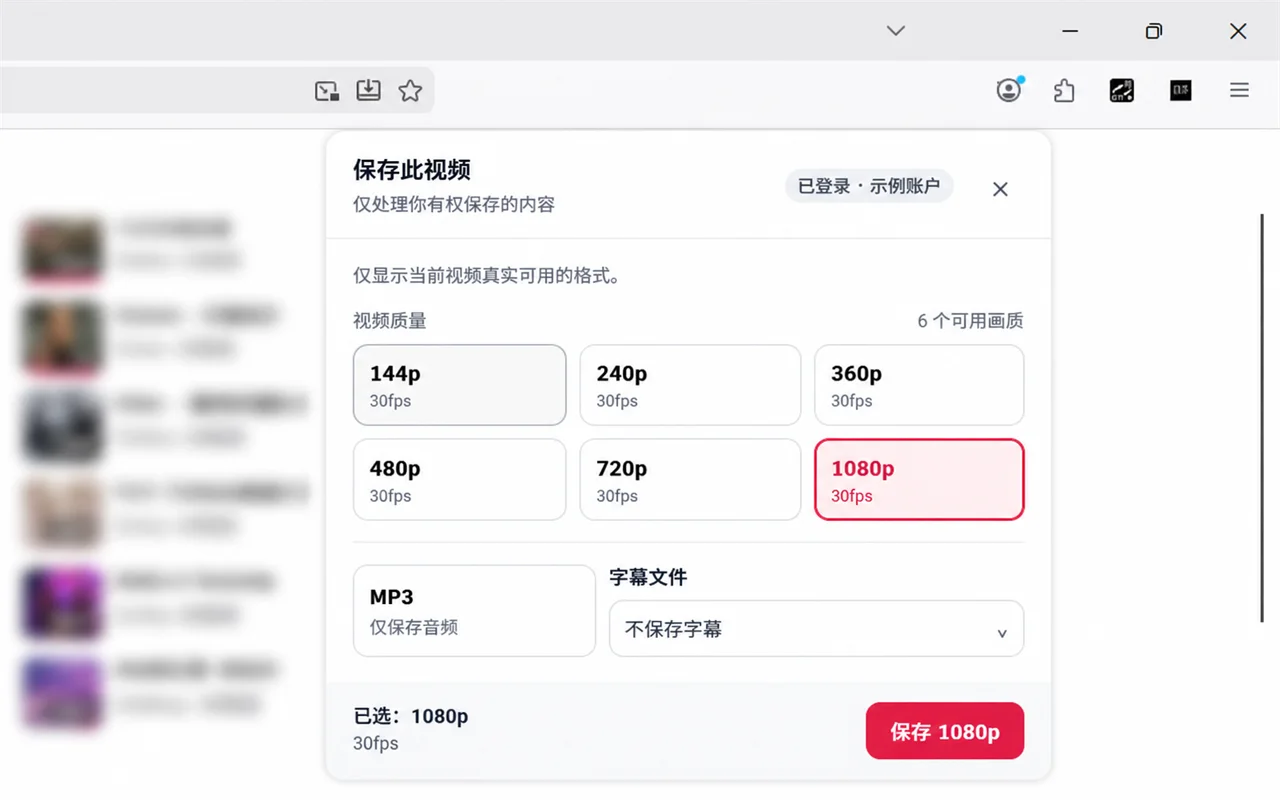
Treat that panel as evidence about this example, not as a universal promise. Another authorized source may list fewer resolutions, a different subtitle situation, or no suitable asset. Selecting 1080p in the pictured example also does not prove that 1080p is operationally best. The correct selection is the smallest available asset that preserves what the approved use genuinely needs.
Choose video when motion changes the meaning
Video is appropriate when gestures, demonstrations, on-screen text, scene changes, or timing between sound and picture are part of the deliverable. It is also useful when a reviewer must see whether captions align with visible speech or actions. In those cases, an audio file or cover would remove information that matters.
Resolution describes pixel dimensions, not editorial value. For a quick phone review, an available 360p or 480p option may be sufficient and easier to transfer. An available 720p option can balance detail and size for many ordinary reviews. An available 1080p asset may be justified when small interface text or fine visual detail must remain readable. Do not infer a higher frame rate or resolution when it is not listed.
Choose audio when the picture adds no required information
Audio can reduce storage and simplify listening when the authorized purpose is speech review, pronunciation practice, an approved interview reference, or another sound-only task. It is not the right choice if the reviewer must interpret charts, demonstrations, captions burned into the picture, or visual context.
Audio-only convenience does not change the authorization requirement for the underlying recording. Keep the relevant permission record with the project. If the project later needs visuals, return to the authorized source and select an available video rather than renaming the audio file.
Choose SRT or WebVTT for timed words
SRT and WebVTT are text documents containing caption cues and timing information. Choose them for accessibility checks, subtitle review, authorized translation preparation, terminology analysis, or importing timed text into a compatible editor. They are much smaller than video, easy to inspect as text, and designed for a different job than media playback.
Open the result in a text-capable application. Look for readable cues, ordered timing lines, and sensible progression through the expected duration. Do not change .srt or .vtt to .mp4: renaming an extension does not turn text into video. If the subtitle language you require is not available, request an authorized transcript or create one through an approved process.
Choose a cover for identification, not playback
A cover is appropriate when a still image is the entire deliverable: a permitted project index, an internal catalog reference, a review queue, or a visual placeholder. It is usually smaller and faster to inspect than video, but it contains neither motion nor audio and cannot prove what happens throughout the source.
Match quality to device, network, and deadline
Quality selection is a resource decision. Larger video generally takes more transfer time and storage, may be harder to send through an approved collaboration system, and can be unnecessary on a small screen. Smaller video can lose text detail or make visual inspection unreliable. Audio and timed text are usually lighter, but they answer narrower questions.
Allow working space beyond the estimated file size because browsers can use temporary storage. If a deadline is close, a smaller suitable option may be more dependable than a larger transfer that cannot be verified in time.
Run analysis and select only returned assets
On the public desktop page, a YouTube link field sits beside the blue Analyze video button. Below it, the broad Downloads panel says tasks update there and completed files provide a secure download link. An Open task center link is visible as well.
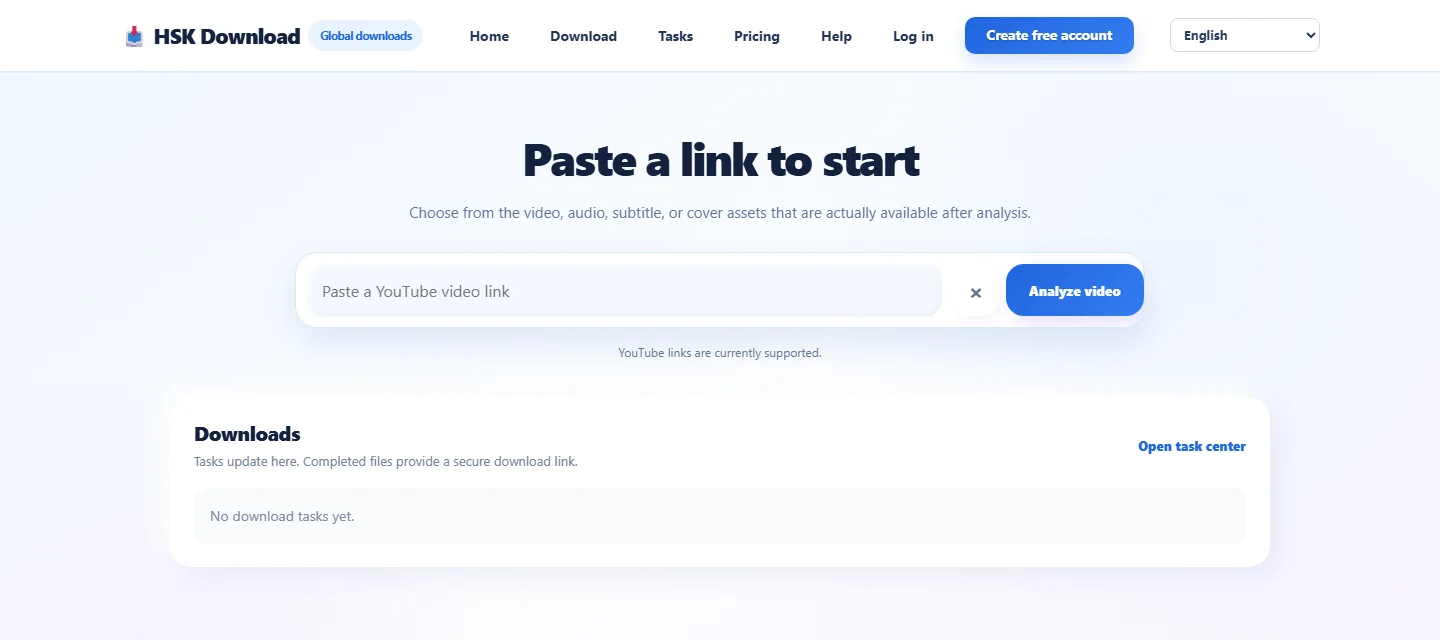
Verify the public video’s title, channel, duration, and your authorization first. Then open the HSK Download tool, paste the cleaned public URL once, and select Analyze video. Compare the returned result with the source before choosing any asset. Select only an option that is actually displayed and matches the decision tree.
The website’s stages are intentionally separate: link analysis, asset selection, task processing, secure delivery, and browser transfer. Completion in the Downloads area does not mean the browser has already saved the file locally. Use the correct secure link, then monitor the browser’s own download panel and destination.
Avoid false conversions and quality assumptions
Likewise, the largest resolution is not automatically the highest-quality decision. A 1080p option can be wasteful for an audio review, while a cover is inadequate for a motion study regardless of its pixel dimensions. “Best” means fit for the authorized use, verified in the receiving environment, and manageable under the project’s time and storage constraints.
If an essential format is missing, do not force private or restricted material through another route. Choose a legitimate listed alternative, revise the deliverable with stakeholders, or request the original from the rights holder.
Verify each asset with a format-specific test
For video, inspect three points across the timeline, verify expected duration, picture, and sound, and watch for an incomplete ending. For audio, listen at the start and later points, compare duration, and confirm the output device. For SRT or WebVTT, inspect readable text, cue order, and timing syntax. For a cover, open the image and verify subject and dimensions.
In every case, confirm a plausible nonzero size, the expected extension, and complete local availability. A cloud placeholder is not an offline-ready file. Rename only after verification, preserve the extension, and keep authorization and task records according to policy.
When two assets belong together, document the pairing. A subtitle file should identify the video and language it accompanies. A cover should identify the source it represents. Clear records prevent a technically valid file from being attached to the wrong project.
Troubleshoot the decision, task, and transfer separately
No suitable option appears: confirm the correct public source and read the options returned by analysis. Missing source assets cannot be invented by changing the interface.
The task was created with the wrong format: stop before duplicating requests, record what was selected, and create a corrected task only if the project is authorized and still needs it.
The task completes but no file appears: open the correct secure completion link, inspect the browser’s downloads, and check the configured local or cloud destination.
The transfer stops: check network stability, free storage, cloud quota, browser prompts, and organization-managed restrictions. Retry a valid delivery link rather than automatically repeating analysis.
The file opens in the wrong app: verify its real extension and choose a compatible application. Timed-text documents, audio, video, and images require different viewers.
The result seems lower quality than expected: compare the option actually selected with the source and the delivered file. A label or renamed filename cannot supply absent detail.
Frequently asked questions
Should I choose video or MP3 for a spoken presentation?
Choose video if gestures, slides, or on-screen text matter. Choose MP3 only when the approved deliverable requires sound and the visuals add no necessary information.
Is 1080p always the best video choice?
No. Use it only when it is offered, needed for visible detail, and practical for the destination device, network, storage, and deadline.
What is the practical difference between SRT and WebVTT?
Both carry timed text, but receiving applications and web workflows may support them differently. Choose the format your destination accepts and that analysis actually offers.
Can a cover replace the video for review?
Only when a single still image satisfies the entire review purpose. A cover cannot preserve motion, audio, sequence, or events elsewhere in the video.
Why is an asset missing after analysis?
Available choices depend on the current public source. If the required asset is absent, select a legitimate suitable alternative or request an authorized original.
Does a completed task mean the file is on my device?
No. Service completion and browser transfer are separate. Open the correct secure link, monitor the browser download, and verify the destination file.
Can format selection bypass DRM or private access controls?
No. Do not use any format or workflow to bypass DRM, paywalls, account controls, private-content permissions, regional restrictions, or security measures.